

YouTube Cue Player
Jump instantly to a specific moment.
Recall playback positions with your keyboard and “play” the video like an instrument.
About
アプリについてA web application that lets you jump instantly to specific moments in a YouTube video. Ideal for music production, language learning, presentations, gaming, and any scenario where you need to return to specific timestamps again and again.
Keyboard Shortcuts
Assign timestamps to the A–L keys and jump instantly with a single key press, making the most of your videos efficiently.
Auto-Save
Press any key while watching to automatically save the current timestamp. Color-coded keys show at a glance which ones are set.
Multilingual Support
Available in English and Japanese. Responsive design optimized for desktop and tablet.
How to
使用方法Enter a YouTube URL
Paste the URL of the YouTube video you want to watch into the input field. The video will load.
Set Timestamps
While watching, press any of the A–L keys at the moment you want to jump to, and that timestamp is saved.
Jump with One Key
Just press a saved key to jump instantly to that moment, so you can use your videos efficiently.
Screen
スクリーンショット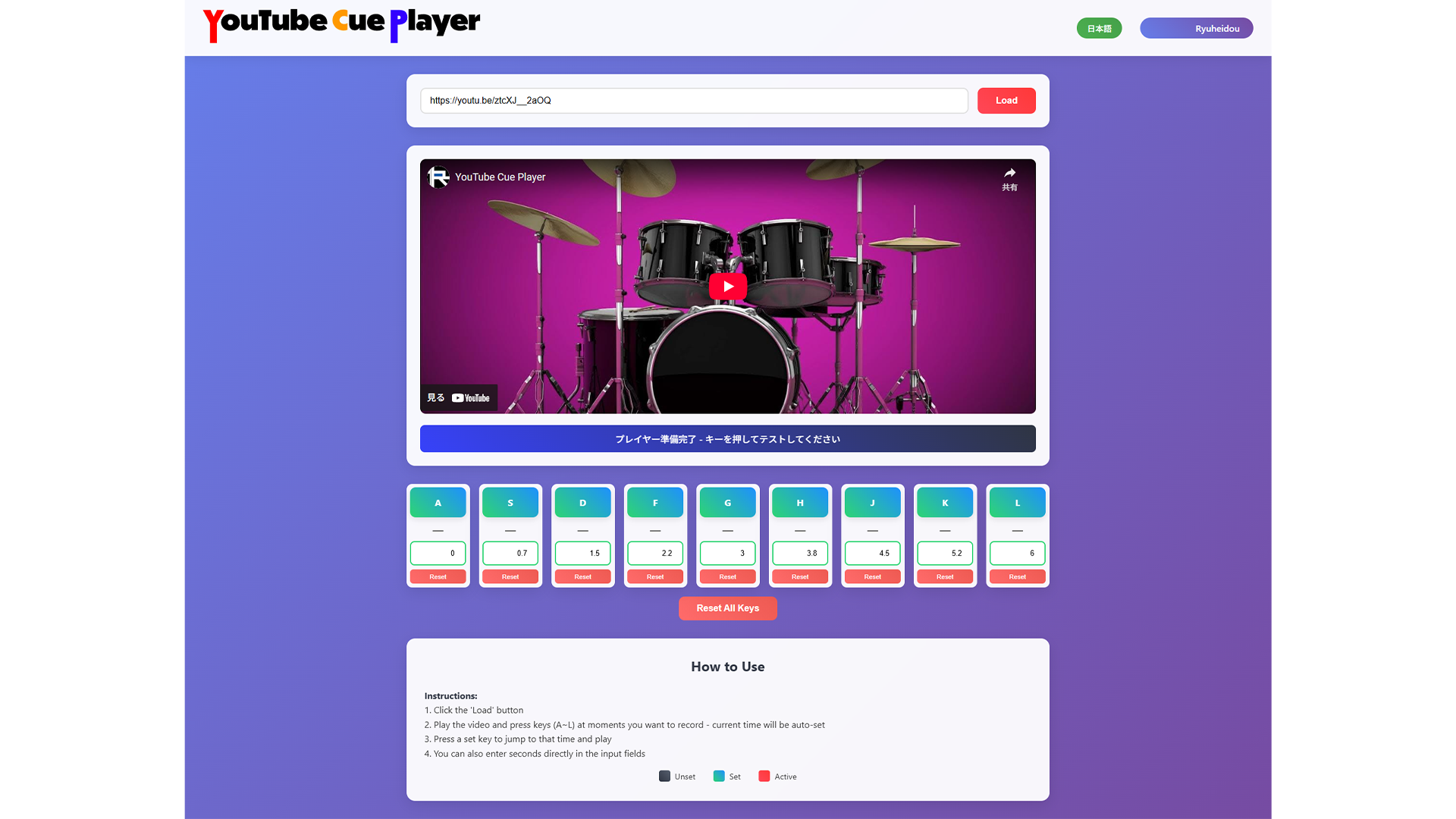
Use
今すぐ使うPrivacy
プライバシーポリシーThis app does not collect, transmit, or share any personal information. See the Privacy Policy for details.